

Workflow module for MIP Fund Accounting®
Microix Requisition Module
Streamline purchase requests from initiation to approval—then push clean, controlled transactions into MIP®.
Click to jump to the section you want to view.
Overview
What the module does
Core Workflow
Request → approval → PO
Key Features
Budget, alerts, mobile
More Capabilities
Analytics, substitutions
Contact
Send us details
What you get
- Standardized requisitions with required fields and controls.
- Multi-level approval workflow that keeps purchases moving.
- Approved requests convert to POs and flow into MIP® as un-posted encumbrances or A/P transactions.
Overview
Take command of your purchasing process with the Microix Requisition Module—built to streamline and track purchases from initiation to approval, while integrating cleanly with MIP Fund Accounting®.
Desktop-friendly request entry
Accounting and non-accounting staff can create and manage purchase requests without chasing paper.
Structured approvals
Configure multi-level approvals with clear accountability and fewer missing details.
Seamless MIP® integration
Approved requests convert into purchase orders and flow into MIP® as un-posted encumbrances or A/P transactions.
Want to see how it fits your process?
We’ll review your current workflow and recommend an implementation approach that keeps controls intact.
Seamless purchase request creation and approval
Set requirements up front, route approvals automatically, and convert approved requests into purchase orders with a clear audit trail.
Looking for assistance? Book a call today.
If you’re evaluating Microix or tightening purchasing controls, we’ll help you map the workflow and set the right approvals.
Requisition module features
Core capabilities that enhance purchasing workflow and provide control from requisition through posting.

Budget Control
Real-time budget oversight using current MIP® ledger data to support fiscal responsibility.

Purchase Order Entries
Submit new or duplicate existing requests for faster routine purchasing with fewer errors.
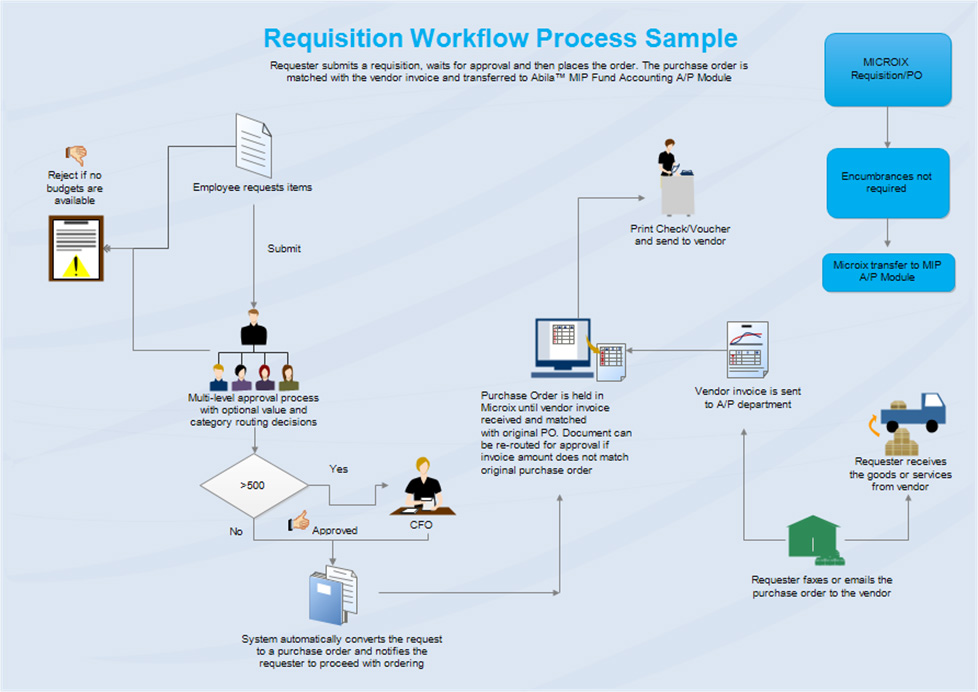
Purchase Order to Invoice
Streamline AP by connecting PO creation to invoice reconciliation within MIP®.
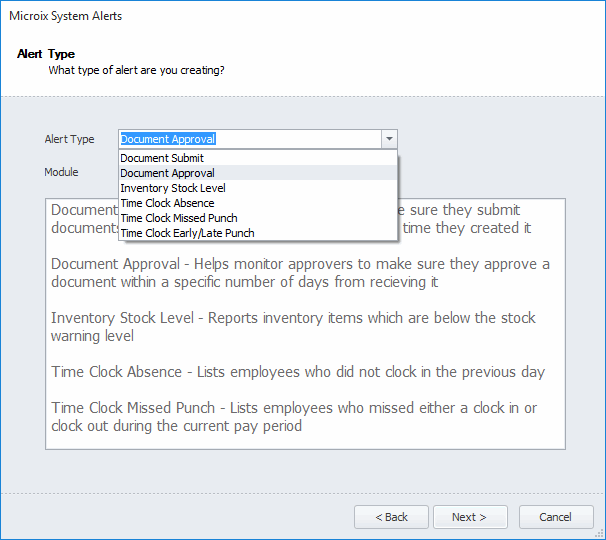
System Alerts
Automated reminders help keep approvals timely and maintain policy adherence.
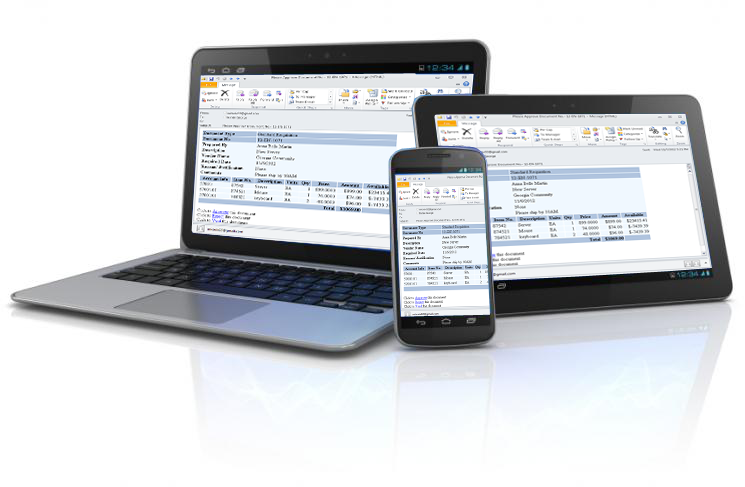
HTML Approval
Approve from anywhere—PC, tablet, or smartphone—without disrupting workflow.
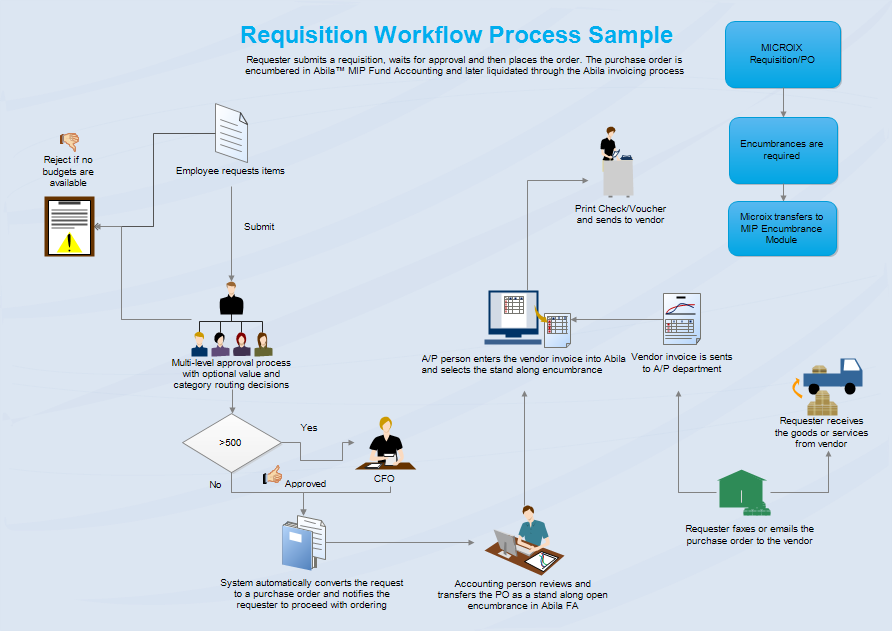
PO to Encumbrance
Encumber after approval, then liquidate during invoicing for a full view of committed funds.
Beyond the basics: extended capabilities
Advanced controls and visibility for organizations that need tighter purchasing governance and reporting.
Budget alerts
Alert or block submissions that exceed budget limits to reinforce fiscal discipline.
Analytical insights
Analyze purchasing by department, user, vendor, or item to spot trends and enforce standards.
Approval substitution
Prevent approval bottlenecks by assigning substitutions when approvers are out.
Integrated with MIP Fund Accounting®
Keep purchasing and accounting aligned without double entry or reconciliation gaps.
Instant answers & audit control
Maintain a comprehensive audit trail with the detail needed for reviews and compliance.
Flexible management options
Managers can approve, deny, modify, or return requisitions for correction to keep quality high.
Other modules
If you’re building a full workflow suite, ask us about these options and how they work alongside Requisition.
Budget
Enter budgets electronically to reduce manual entry and speed up planning cycles.
Timesheet
Automate timesheet management and simplify approvals and downstream posting.
Inventory
Track inventory activity efficiently and keep purchasing aligned with stock needs.
Not sure which modules you need?
Tell us your approval steps, purchasing volume, and reporting requirements—we’ll recommend the right setup.
Drop us a line
Share your current purchasing workflow (who requests, who approves, and what needs to hit MIP®), and we’ll point you to the best option.
Prefer a call?
Schedule a time that’s convenient and we’ll walk through your workflow and next steps.